Camera Calibration
Analyzes the factory/cali image files exported from the device, replaces the camera SNs in them, and regenerates the calibration data. The output is a newly generated image file; the original images are not modified.
When to Use
- After replacing a camera module, write the new camera's SN into the image so the device detects and uses it normally again.
Before You Start
- Prepare the device's matching factory and cali image pair (exported via Partition R/W, or obtained from another source).
- Know the new camera module's SN.
- Your account has Camera Calibration access.
Steps
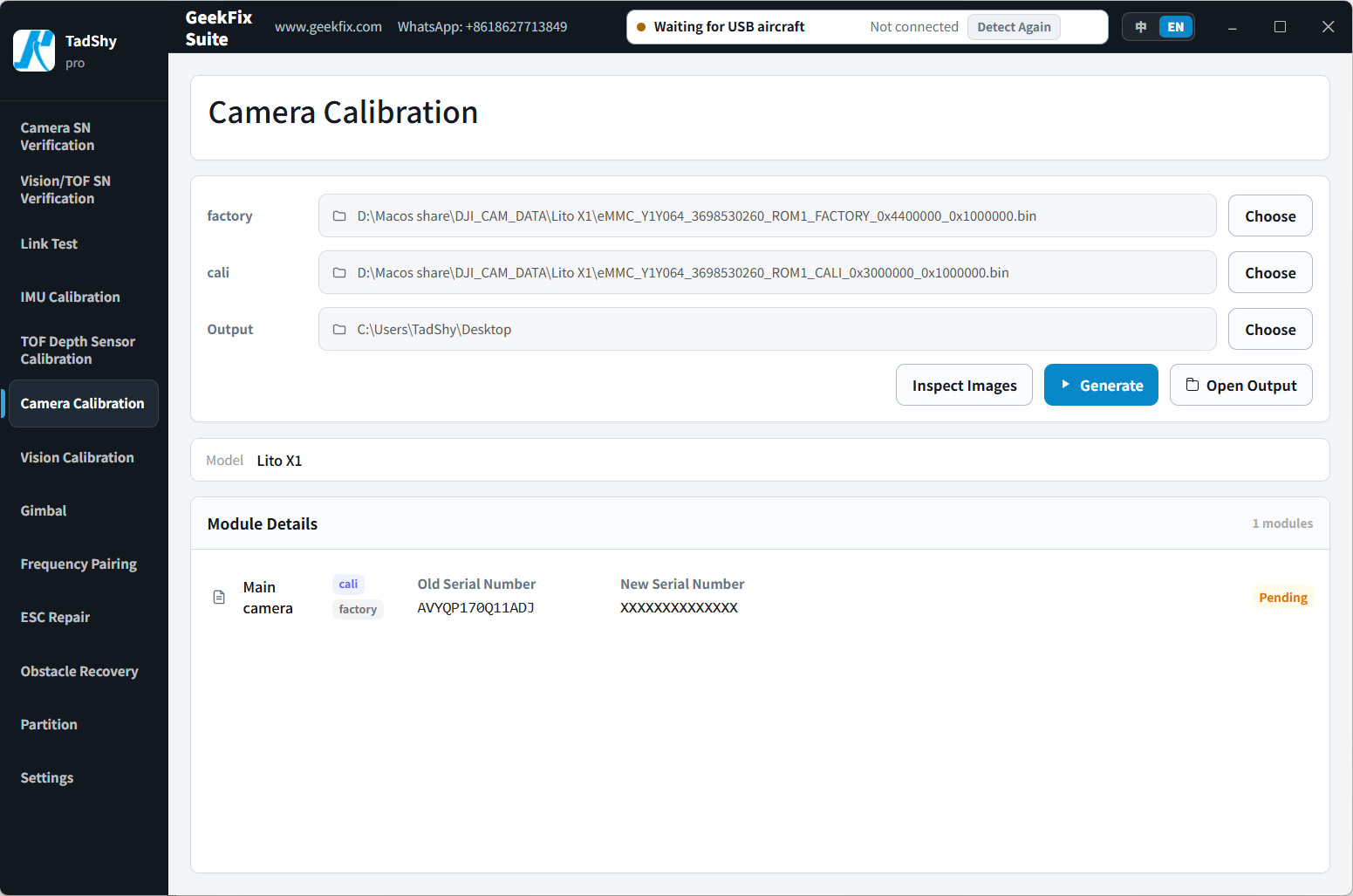
- Open Camera Calibration.
- Click Choose on the factory row and select the factory image file (file name must contain factory).
- Click Choose on the cali row and select the cali image file (file name must contain cali).
- Click Choose on the Output row and select the output folder (the generated files are saved here).
- Click Inspect Images.
- In Module Details, check the detected model and modules, and enter the new serial number for the module you are replacing.
- Click Generate.
- Click Open Output to open the folder containing the generated files.
- Write the new images back to the device (using Partition R/W or another programmer) and restart the device to confirm.
Reading the Results
- The software automatically identifies the model and camera modules from the image content and lists the modules it can process.
- New data is generated only for modules where you entered a new serial number. New files are created in the output folder; the original files stay unchanged.
Notes (by Model)
- Matrice 3TD: a complete and consistent factory/cali image pair is required. Only one or both of the wide-angle and zoom modules can be changed per run; the thermal imaging module is read-only.
- Mavic 3M: all 5 camera modules and the matching image pair structure must be detected.
- Mavic 4T / 4TD: the laser/illumination module is read-only.
- Mavic 3E: for serial number repair after a camera module replacement, use Enterprise Camera Calibration.
- See the Supported Models for the modules detectable on each model.
If Something Goes Wrong
- The image is incomplete or the pair doesn't match: export the complete images again and retry.
- No modules detected: check that the images come from a supported model.
- Repeated failures: take a screenshot and contact 181806465@qq.com.
Supported Models
22 models with explicit rules (Air / Mini / Mavic / Matrice / Avata / Neo / Flip series, etc.). See the Supported Models for the full list.